PyMC BAYESIAN ANALYSIS GUIDE FOR MARKETING DATA ANALYSTS

A Comprehensive Reference for Building Reliable Models.
Document version: 1.1
Last updated: December 2025
Target audience: Marketing analysts working with website traffic, signups, conversions, sales pipeline, channels, and campaigns.
CRITICAL SUCCESS FACTORS
These three rules are non-negotiable for every PyMC analysis:
- ALWAYS check prior predictive distributions - Your model must make sense BEFORE seeing data.
- ALWAYS choose distributions matching your data constraints - Count data needs count distributions, positive data needs positive distributions.
- ALWAYS validate with posterior predictive checks - If your model cannot
reproduce observed data, it is wrong.
THE COMPLETE BAYESIAN WORKFLOW
Follow these four stages in order. No shortcuts.
STAGE 1: Design Your Model
- Understand your data structure and constraints
- Choose appropriate likelihood distributions
- Specify priors based on domain knowledge
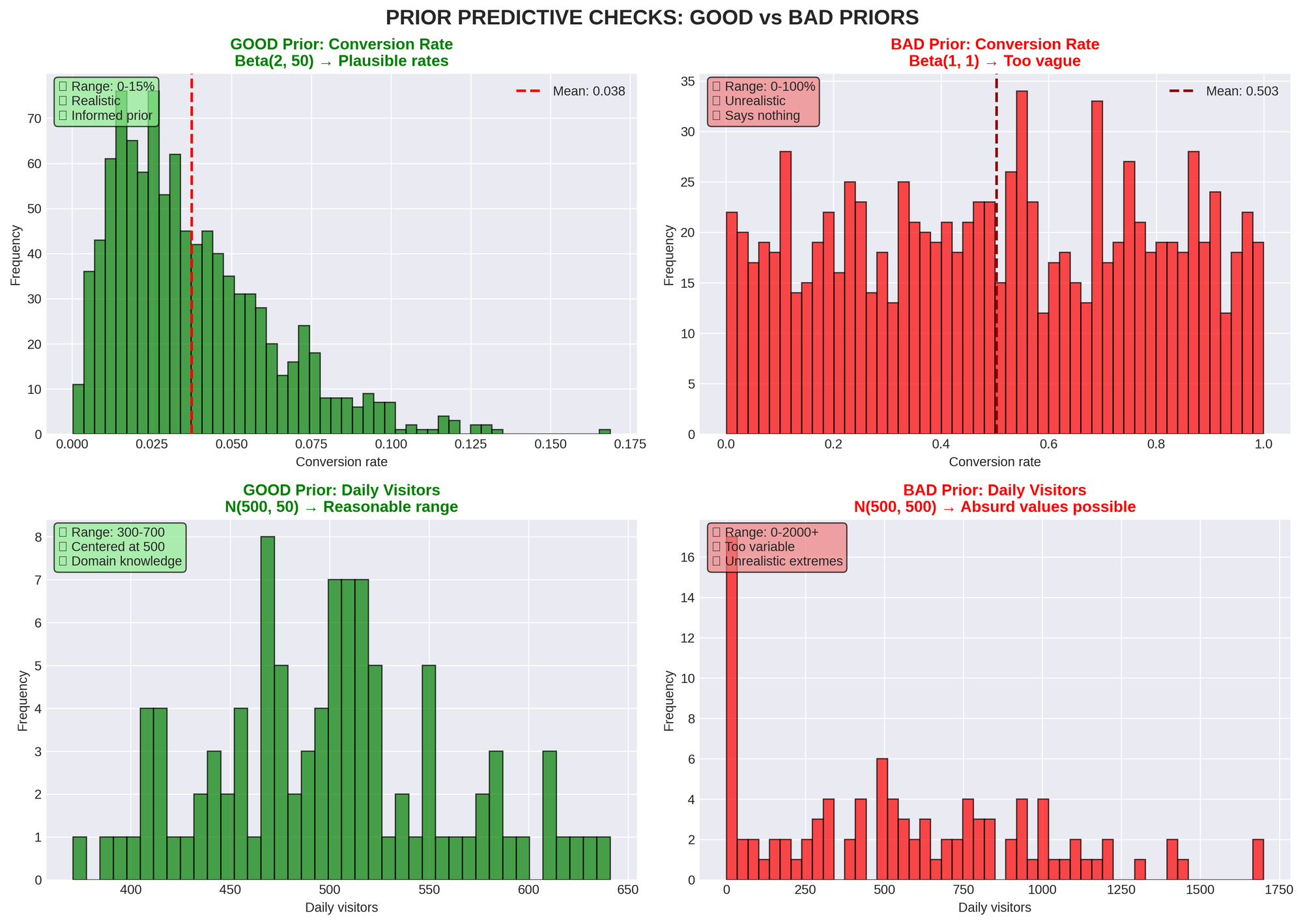
STAGE 2: Check Priors (Prior Predictive)
- Sample from priors before seeing data
- Verify simulated values are plausible
- If you see absurd extremes, tighten your priors
STAGE 3: Fit the Model (MCMC Sampling)
- Use sufficient draws, tuning steps, and chains
- Monitor convergence diagnostics
- Address any warnings immediately
STAGE 4: Validate Results (Posterior Predictive)
- Generate fake data from fitted model
- Compare to observed data
- If model cannot reproduce observations, it's wrong
DATA SANITY CHECK (Start Here Every Time)
Before building any model:
- EXAMINE BASIC STATISTICS
- Mean, variance, min, max
- Standard deviation and range
- Check for outliers
- VERIFY DATA PROPERTIES
- Units and any transformations
- Presence of zeros or missing values
- Data bounds and constraints
- UNDERSTAND DATA TYPE
- Is it counts (whole numbers only)?
- Is it continuous and always positive?
- Can it be negative?
- Is it bounded (0-1, percentages)?
- Is it binary (yes/no)?
CHOOSING THE RIGHT DISTRIBUTION
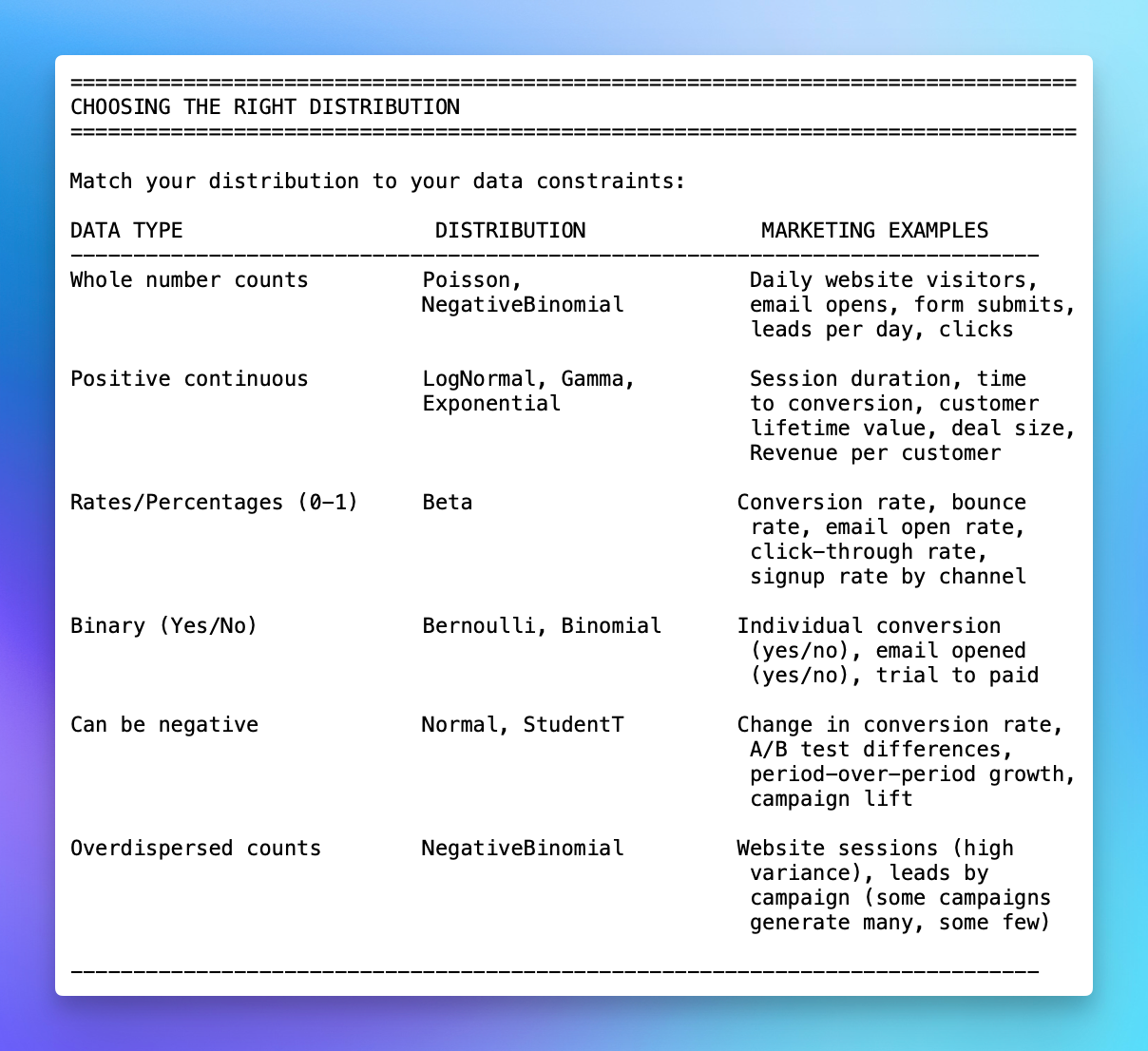
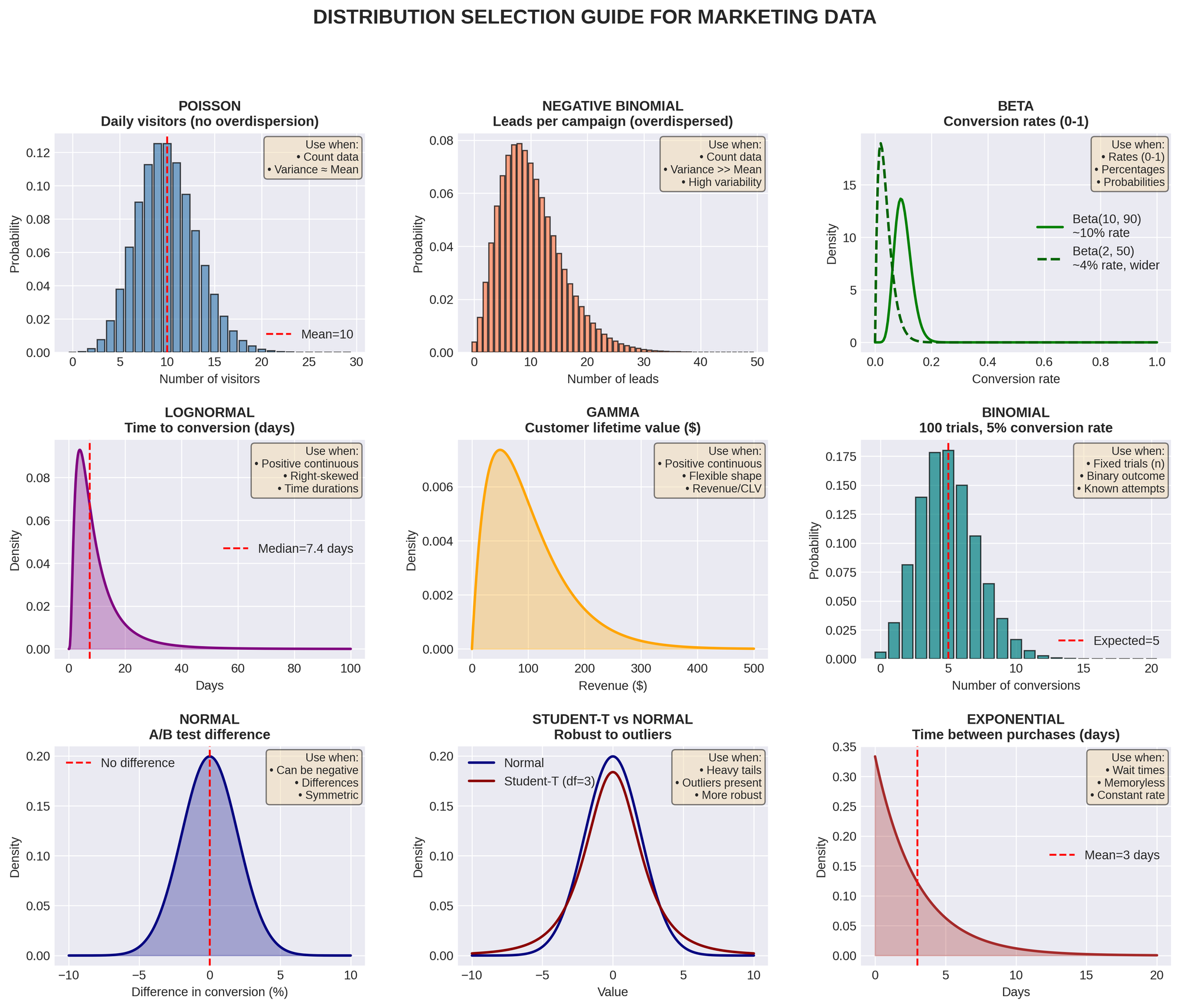
Match your distribution to your data constraints:
QUICK DECISION TREE:
- Can I count it in whole numbers? → Poisson / NegativeBinomial
- Is it always positive measurement? → LogNormal / Gamma
- Is it a percentage or rate? → Beta
- Is it just yes/no? → Bernoulli / Binomial
- Can it be negative? → Normal / Student-T
MARKETING-SPECIFIC EXAMPLES:
Example 1: Daily Website Visitors
- Data: 450, 523, 389, 612, 501 visitors per day
- Type: Counts (whole numbers)
- Distribution: Poisson or NegativeBinomial
- Why NegativeBinomial? If variance >> mean (weekends vs weekdays vary a lot)
Example 2: Conversion Rate by Channel
- Data: Paid: 3.2%, Organic: 4.5%, Email: 5.1%
- Type: Percentage/rate (bounded 0-1)
- Distribution: Beta
- Prior example: Beta(2, 50) means ~4% with moderate uncertainty
Example 3: Time to First Purchase
- Data: 3.5 days, 12.1 days, 1.2 days, 45.3 days
- Type: Positive continuous (can't be negative)
- Distribution: LogNormal or Gamma
- Why LogNormal? Time data is often right-skewed
Example 4: Lead-to-Opportunity Conversion
- Data: 150 leads, 23 converted to opportunities
- Type: Binary outcomes
- Distribution: Binomial(n=150, p=?)
- Model learns: What's the conversion probability p?
Example 5: A/B Test Revenue Impact
- Data: Control mean $1,250, Treatment mean $1,310
- Type: Difference can be positive or negative
- Distribution: Normal for difference
- Goal: Is treatment > control?
COMMON PITFALLS TO AVOID
- MIS-SPECIFYING PRIORS
Bad: Using Normal(0, 1000) for a variance parameter
Good: Using HalfNormal(5) for positive-only variance
Remember: Priors must respect constraints (positive, bounded) - WRONG LIKELIHOOD FUNCTION
Bad: Using Normal distribution for count data (e.g., daily signups)
Good: Using Poisson or NegativeBinomial for counts
Remember: Match distribution to data type.
Marketing Example:
Bad: Modeling email opens (counts) with Normal distribution
Good: Modeling email opens with Poisson or NegativeBinomial - IGNORING CONVERGENCE DIAGNOSTICS
Never ignore: Divergences, high R-hat, low ESS
These mean: Your results are unreliable
Action required: Fix before interpreting results - MISINTERPRETING RESULTS
Don't: Treat credible intervals like confidence intervals
Don't: Over-interpret point estimates
Do: Report full uncertainty (credible intervals)
Do: Acknowledge subjective prior choices. Key Difference:- Credible interval: "Given model + priors, there's X% probability
parameter lies here." - Confidence interval: "In repeated sampling, X% of such intervals
contain the true parameter."
- Credible interval: "Given model + priors, there's X% probability
- INCOMPLETE POSTERIOR PREDICTIVE CHECKS
Bad: Only checking mean predictions
Good: Check entire distribution, tails, variance
Remember: Model must reproduce all features of data.
Marketing Example:
Check if your model can generate both typical days (500 visitors) AND
extreme days (2000 visitors from viral post) - FIXING VARIANCE WITHOUT JUSTIFICATION
Bad: Setting sigma to a fixed value arbitrarily
Good: Let the model learn variance from data
Exception: Only fix if you have very strong domain knowledge.
Marketing Example:
Don't assume conversion rate variance is fixed at 0.01 unless you have
strong historical evidence
SPECIFYING PRIORS CORRECTLY
GENERAL PRINCIPLES
- RESPECT CONSTRAINTS
- Use HalfNormal, HalfCauchy, Exponential for positive-only parameters
- Use Beta for rates between 0 and 1
- Never use unbounded priors for bounded parameters
- Prefer HalfNormal / Exponential as defaults
- Use HalfCauchy only when you intentionally want very heavy tails and
you've checked prior predictive
- USE DOMAIN KNOWLEDGE
- Set realistic ranges based on subject matter expertise
- Avoid overly tight priors unless strongly justified
- Document your reasoning
Marketing Examples:
- Website conversion rate: Beta(2, 50) suggests ~4% with uncertainty
- Daily visitors: NegativeBinomial with mu=500, alpha=10 if historical
average is 500 - Email open rate: Beta(10, 90) suggests ~10% with moderate confidence
- HANDLE CORRELATION AND WEAK IDENTIFICATION
If parameters are highly correlated or weakly identified, consider
reparameterization, stronger priors, or simplifying structure - CHECK PARAMETERIZATION
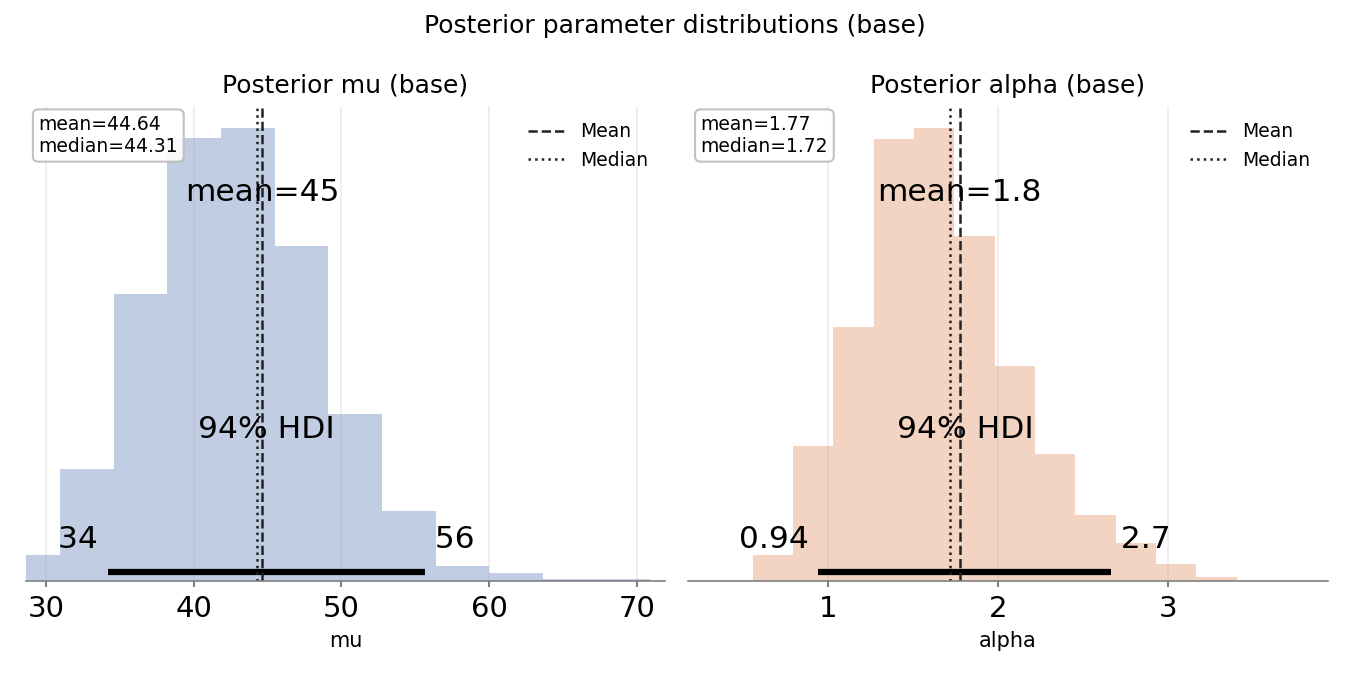
Example: NegativeBinomial can be parameterized as (mu, alpha) or (n, p)- Understand what each parameter means (alpha, mu, sigma, etc.)
- Verify formulas for mean, variance, overdispersion
- Different distributions may use different parameterizations
- mu = mean, alpha = overdispersion
- Verify which parameterization your library uses!
PRIOR PREDICTIVE WORKFLOW
- Define priors
- Sample from priors (before seeing data)
- Generate simulated datasets
- Ask: "Are these values plausible?"
- If no → Adjust priors
- Repeat until priors generate reasonable data
MARKETING PRIOR EXAMPLES
Email Campaign Open Rate:
- Prior: Beta(10, 90)
- Implies: ~10% open rate with some uncertainty
- Prior predictive: Generates rates between 5-20% (reasonable)
Daily Website Visitors:
- Prior: mu ~ Normal(500, 100), alpha ~ Exponential(0.1)
- Implies: Average around 500 visitors, moderate overdispersion
- Prior predictive: Should generate days between 200-1000 visitors
Conversion Rate by Channel:
- Prior for each channel: Beta(2, 50)
- Implies: Weak prior around 4%, allows learning
- Check: Does prior generate rates between 0.01-0.15? (reasonable for most
channels)
Time to Conversion (days):
- Prior: LogNormal(mu=2, sigma=1)
- Implies: Median ~7 days (exp(2)), wide spread
- Prior predictive: Should generate times from 1 day to 100+ days
CONVERGENCE DIAGNOSTICS (Must-Check List)
- R-HAT (GELMAN-RUBIN STATISTIC)
Target: ≤ 1.01 (ideally 1.00-1.01)
Meaning: Do all chains agree on the same distribution?
If > 1.01: Chains disagree; run longer or reparameterize
Action: Increase draws/tune or fix model structure - EFFECTIVE SAMPLE SIZE (ESS)
Target: Hundreds+ for stable estimates
Meaning: How many independent samples do we have?
If < 100: Chain is sluggish, autocorrelation is high
Action: Increase draws or improve parameterization - DIVERGENCES
Target: 0 (zero divergences)
Meaning: Sampler hit trouble spots in posterior
If > 0: Sampler is missing important posterior regions
Action:- Increase target_accept (try 0.95 or 0.99)
- Reparameterize model (non-centered parameterization)
- Simplify model structure
VISUAL DIAGNOSTICS
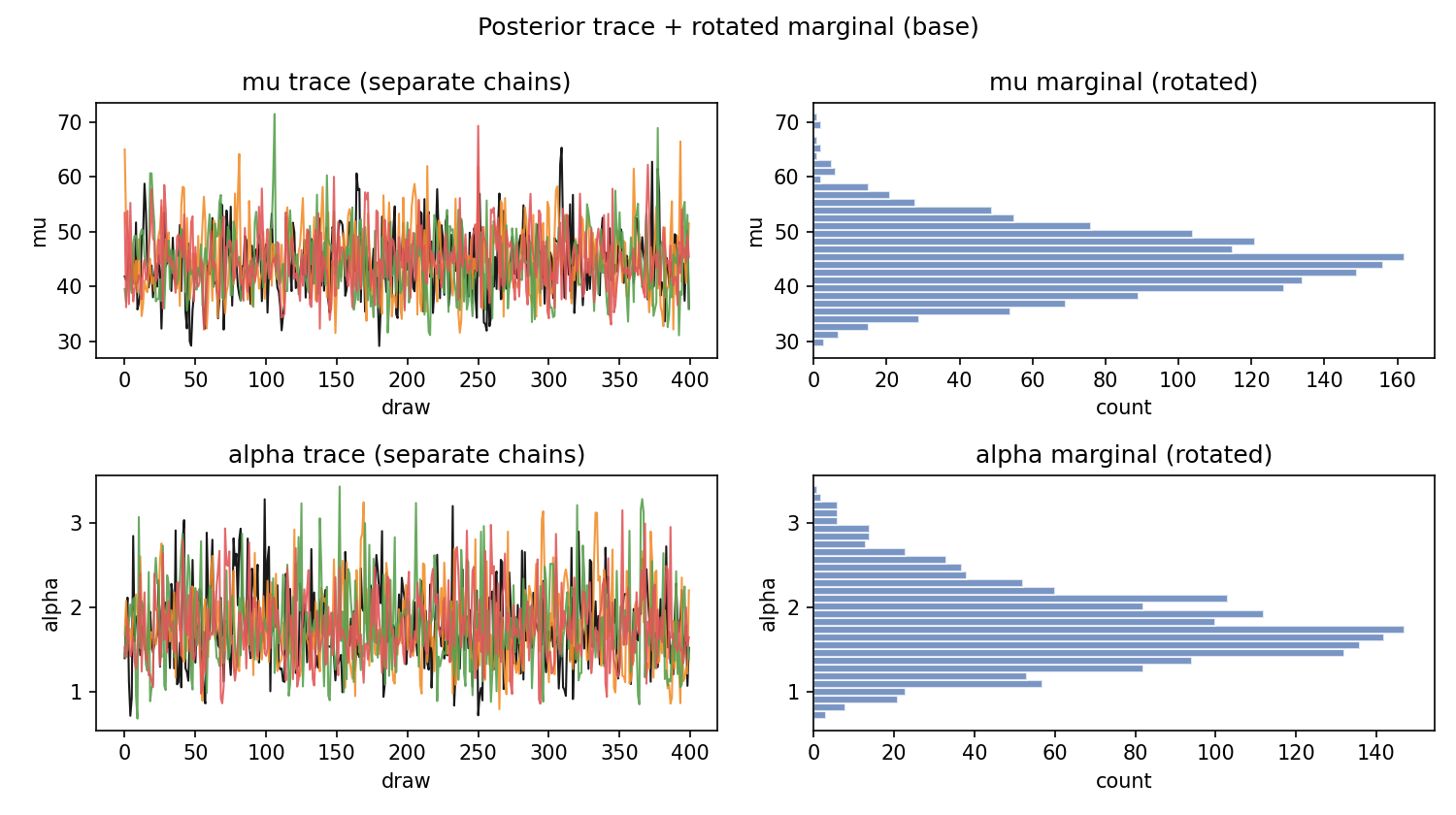
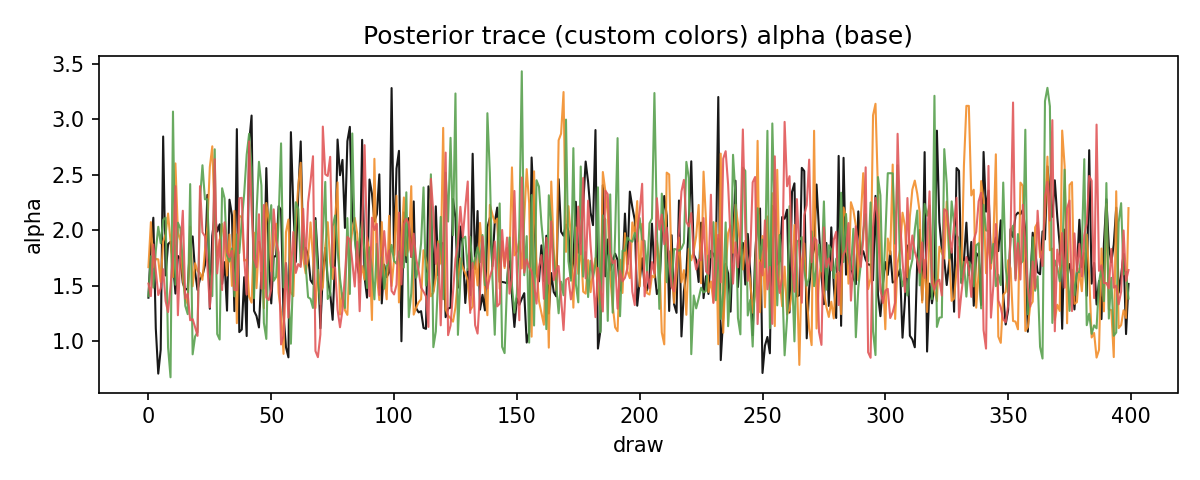
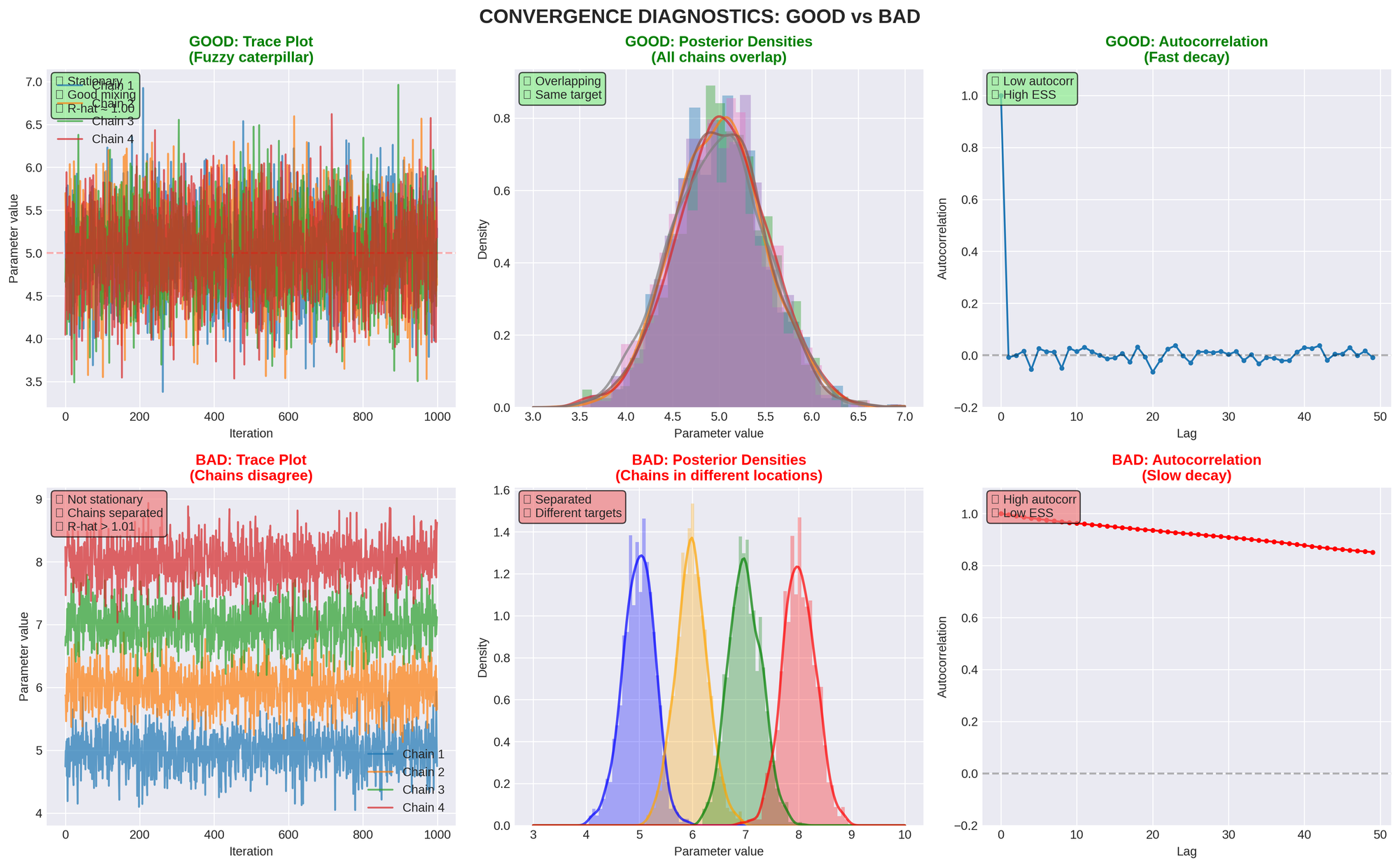
TRACE PLOTS
- Good: Chains look like "fuzzy caterpillars"
- Bad: Chains show trends, drift, or distinct bands
- Look for: Stationarity, mixing, convergence
RANK PLOTS
- Good: Uniform distribution across ranks
- Bad: Patterns or clustering in ranks
- Better than: Traditional trace plots for detecting issues
CHAIN COMPARISON (KDE PLOTS)
- Good: All chains have overlapping distributions
- Bad: Chains sit in different locations
- Indicates: Convergence problems if separated
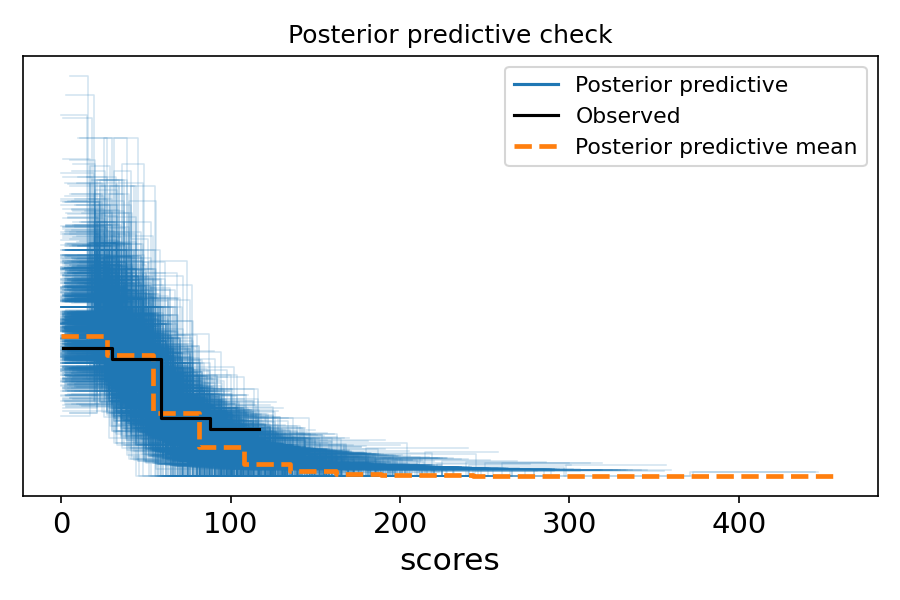
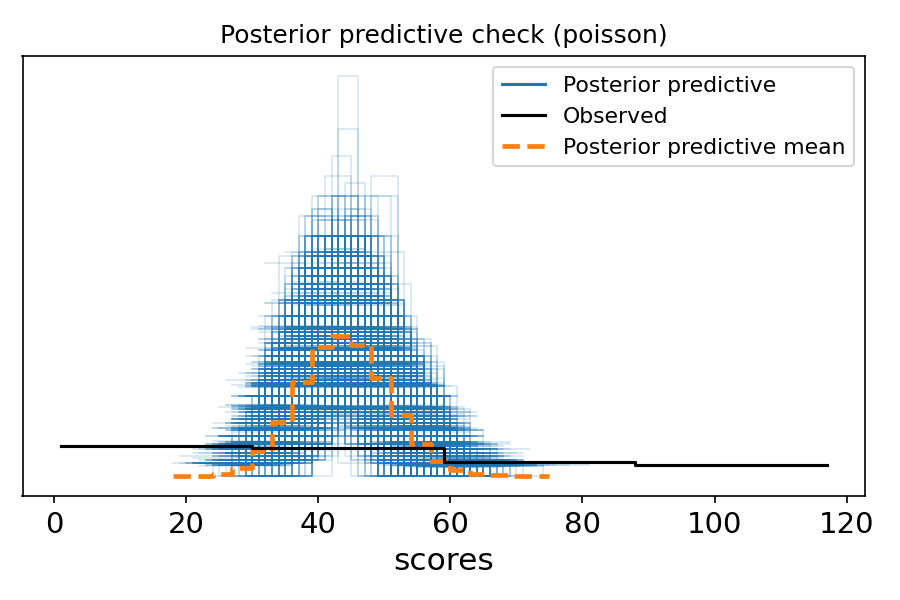
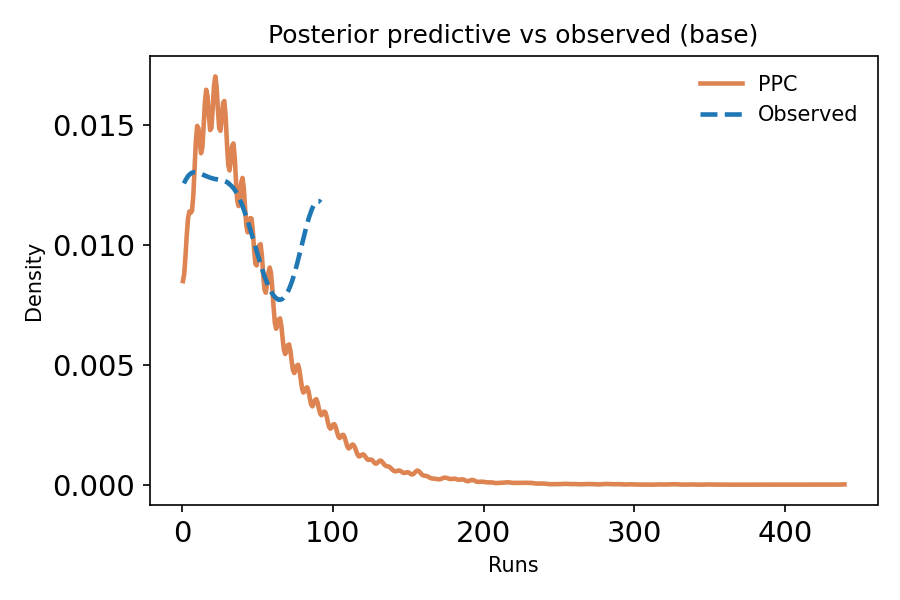
POSTERIOR PREDICTIVE CHECKS (PPC)
PURPOSE
Verify that your fitted model can reproduce the observed data.
WHAT TO CHECK
- Central tendency: Does model match observed mean/median?
- Spread: Does model capture observed variance?
- Tails: Can model generate extreme values seen in data?
- Shape: Does overall distribution match?
- Coverage: Are observed totals within predicted range?
INTERPRETATION
- Good PPC: Observed data looks typical compared to predictions
- Bad PPC: Observed data is extreme or outside predicted range
- Action if bad: Model is wrong; revise and refit
COMMON PPC FAILURES
- Under-fit tails: Use heavier-tailed distribution (e.g., StudentT instead
of Normal) - Under-dispersed: Use NegativeBinomial instead of Poisson
- Wrong central tendency: Check likelihood specification
- Systematic bias: Missing predictors or wrong functional form
- Overlay histogram/density of observed vs simulated
- Time series overlay (if data is temporal)
- Also: Check coverage: what % of observed points fall inside 50% / 90%
predictive intervals?
MARKETING PPC EXAMPLES
Example 1: Daily Visitor Model
- Check: Can model generate both typical days (400-600) AND peak days
(1500+)? - Check: Does model capture day-of-week effects if present?
- Check: Are 90% of observed days within model's 90% predictive interval?
Example 2: Conversion Rate Model
- Check: Does model predict rates consistent with historical performance?
- Check: Can model capture variation between channels?
- Check: Does model handle campaigns with very few conversions?
Example 3: Email Campaign Performance
- Check: Does model reproduce observed open rates across campaigns?
- Check: Can model handle campaigns with high engagement (15%+) and low
engagement (2%)? - Check: Does model account for list fatigue over time?
PERFORMANCE OPTIMIZATION
PREFER NUMPYRO NUTS WHEN AVAILABLE
Setup:
from pymc.sampling.jax import sample_numpyro_nuts
import os
Set cache directories to avoid permission issues
os.environ['MPLCONFIGDIR'] = '.matplotlib_cache'
os.environ['PYTENSOR_FLAGS'] = 'compiledir=.pytensor_cache'
Sampling Parameters:
- draws: ≥ 400 (1000+ recommended)
- tune: ≥ 400 (1000+ recommended)
- chains: ≥ 4
- target_accept: 0.9 (0.95 for difficult geometries)
- chain_method: "parallel"
ADVANTAGES OF NUMPYRO NUTS
- No C++ compilation issues (uses JAX backend)
- More efficient than Metropolis-Hastings
- Better automatic adaptation and tuning
- Proper convergence with multiple chains
- GPU acceleration available
- Faster execution overall
FALLBACK STRATEGY
- First choice: NumPyro NUTS with full data
- If unavailable: PyMC NUTS with reduced draws/tune
- Ensure: PyMC version exposes pymc.sampling.jax
- Warning: PyMC NUTS is slower than NumPyro
SAMPLING BEST PRACTICES
- Use full dataset (don't subset for speed)
- Run minimum 400 draws + 400 tune with 4 chains
- Watch diagnostics: R-hat ≤ 1.01, ESS high, divergences = 0
- Rerun with more draws/chains if thresholds not met
- Select draws/tune/chains to ensure valid fit
MODEL COMPARISON
LEAVE-ONE-OUT CROSS-VALIDATION (LOO)
What to check:
- ELPD_LOO (EXPECTED LOG POINTWISE PREDICTIVE DENSITY)
- Higher (less negative) is better
- Difference > 10 is meaningful
- Measures out-of-sample predictive accuracy
- P_LOO (EFFECTIVE NUMBER OF PARAMETERS)
- Should be close to actual parameter count
- Very large values indicate overfitting or missing noise term
- Unusually high = model forcing structure on data
- PARETO-K DIAGNOSTIC
- Must be < 0.7 for reliable results
- k > 0.7 means LOO estimates are unreliable
- Action if k > 0.7: Fix model before trusting results
RULES OF THUMB
- Large elpd_loo difference (>10) = meaningful improvement
Consider Δelpd relative to its SE (if Δelpd is small vs SE, don't
overclaim) - p_loo unusually high = model complexity warning
p_loo is an effective complexity measure; unusually high values can
indicate overfitting, weak priors, or a missing noise term - Any Pareto-k > 0.7 = results unreliable
MARKETING EXAMPLE: COMPARING CAMPAIGN MODELS
Model A: Simple Poisson for daily leads
- elpd_loo = -850.2
- p_loo = 2.1 (close to 2 parameters)
- Pareto-k: all < 0.5 (good)
Model B: NegativeBinomial with channel effects
- elpd_loo = -825.7
- p_loo = 5.3 (close to 5 parameters)
- Pareto-k: all < 0.6 (good)
Conclusion: Model B is better (elpd_loo difference = 24.5 >> 10)
The extra complexity is justified by improved predictions
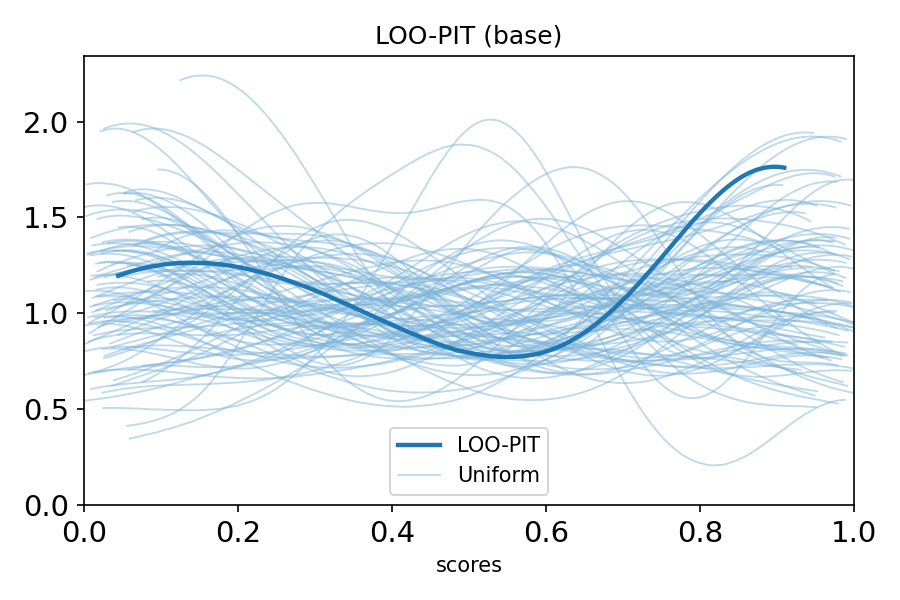
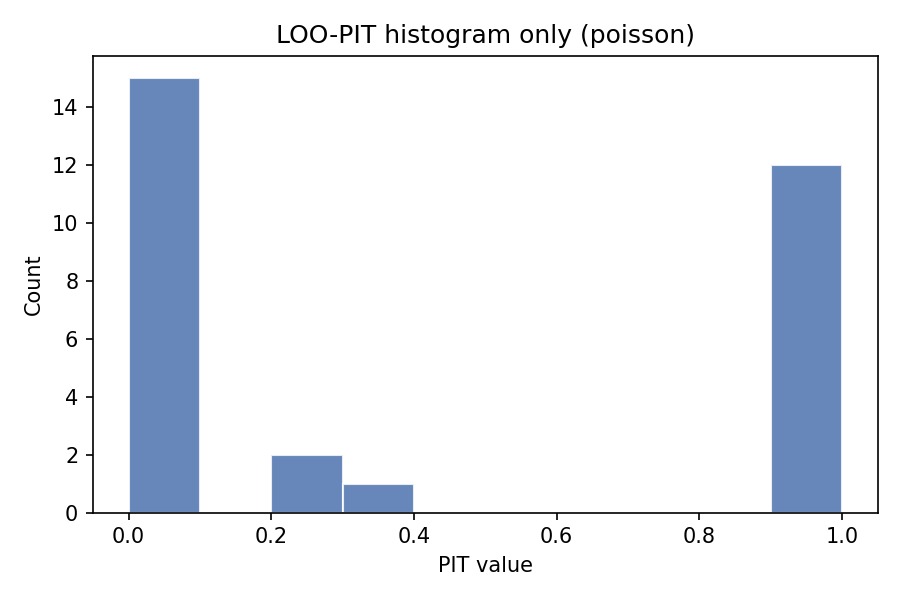
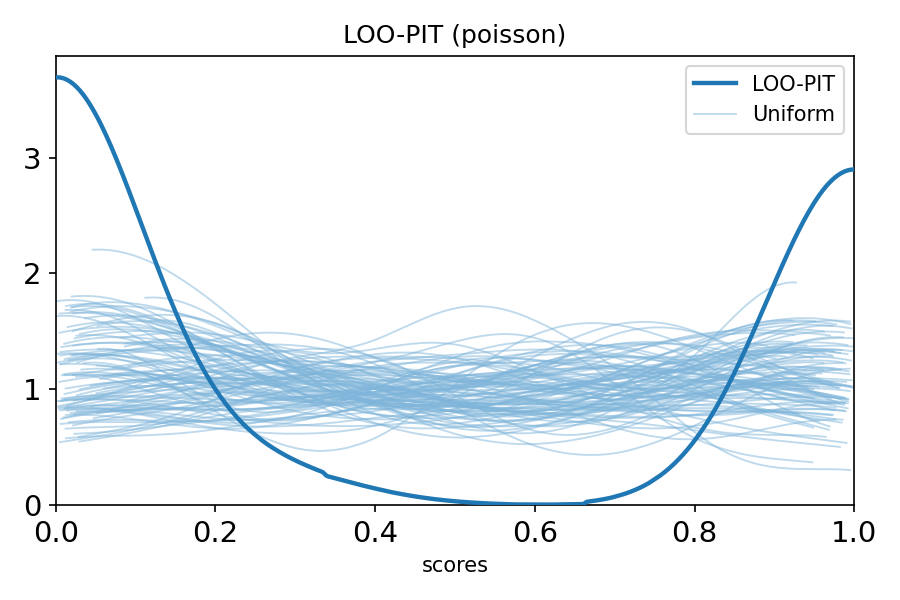
LOO-PIT (PROBABILITY INTEGRAL TRANSFORM)
Purpose: Check whether your model has realistic uncertainty
What it checks:
- Does model predict unseen data well?
- Is model over-confident or under-confident?
- Are predictions properly calibrated?
Interpretation:
- Uniform distribution = well-calibrated
- U-shaped = over-confident (intervals too narrow)
- Inverse-U = under-confident (intervals too wide)
WAIC (WIDELY APPLICABLE INFORMATION CRITERION)
When to use:
- Alternative to LOO when log-likelihood is available
- Compute: az.waic(idata)
- Compare elpd_waic: higher (less negative) is better
Warnings:
- If var(log p) > 0.4, WAIC may be unreliable
- Prefer LOO if WAIC shows warnings
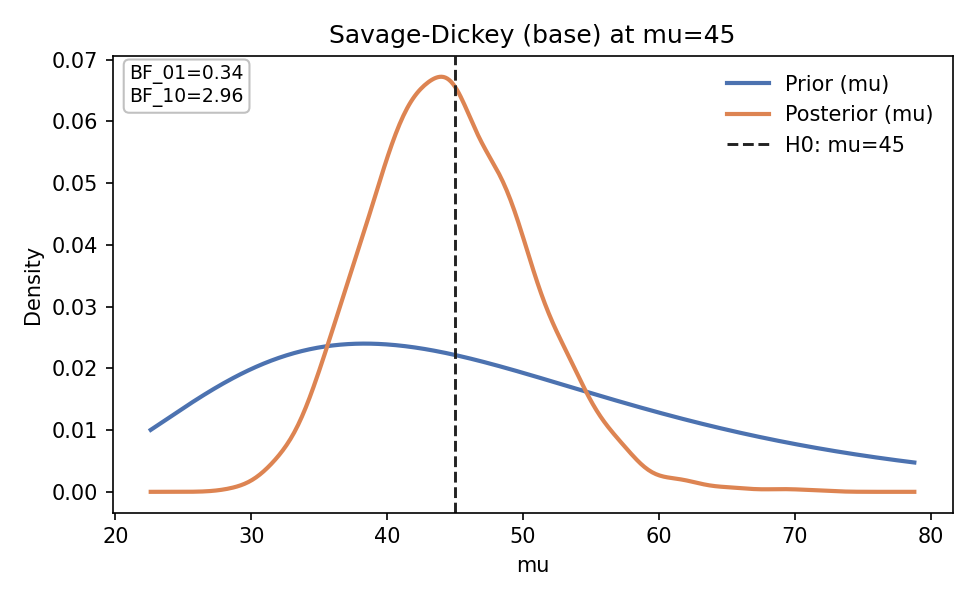
SAVAGE-DICKEY BAYES FACTOR
Use case: Testing point-null hypothesis in nested models
Requirements:
- Proper priors (not improper)
- Nested model structure
- Testing specific parameter value
Computation:
BF_01 = prior_density(theta=0) / posterior_density(theta=0)
Interpretation:
- BF ~ 1: Weak evidence
- BF 3-10: Moderate evidence
- BF > 10: Strong evidence
- BF < 1/3: Evidence against null
Marketing Example:
Testing if paid search has zero effect on conversions
- If BF_01 > 10: Strong evidence of no effect
- If BF_01 < 1/3: Strong evidence of positive effect
COMPLETE DIAGNOSTIC CHECKLIST
Use this checklist for every model:
BEFORE FITTING
[ ] Data sanity check completed
[ ] Distribution matches data constraints
[ ] Priors specified with justification
[ ] Prior predictive check shows reasonable values
[ ] Parameterization verified (mu, alpha, sigma meanings)
DURING FITTING
[ ] Used NumPyro NUTS if available
[ ] Set appropriate draws/tune/chains
[ ] Cache directories configured
[ ] Sampling completed without errors
AFTER FITTING (CONVERGENCE)
[ ] R-hat ≤ 1.01 for all parameters
[ ] ESS > 100 (preferably hundreds+) for all parameters
[ ] Divergences = 0
[ ] Trace plots show good mixing
[ ] Rank plots show uniform distribution
[ ] Chains converge to same distribution
VALIDATION
[ ] Posterior predictive check performed
[ ] PPC shows model reproduces observed data
[ ] PPC covers central tendency, spread, and tails
[ ] LOO computed and Pareto-k < 0.7
[ ] LOO-PIT shows proper calibration
[ ] WAIC computed if appropriate
MODEL COMPARISON (IF APPLICABLE)
[ ] Compared to simpler baseline model
[ ] elpd_loo differences computed
[ ] p_loo values reasonable
[ ] Best model selected with justification
REPORTING
[ ] Report full credible intervals (not just point estimates)
[ ] Acknowledge uncertainty
[ ] Document prior choices
[ ] Note any model limitations
[ ] Avoid over-interpreting results
WARNING SIGNS & FIXES
BAD CHAINS (SYMPTOMS)
- Chains sit in different bands
- Chains drift over time
- Distinct KDEs for different chains
- High R-hat values
Why this happens:
- Multimodal posterior
- Poor geometry (funnel, high correlation)
- Misspecified priors/likelihood
- Weak identifiability
- Insufficient tuning/draws
- Too-low target_accept
Fixes:
- Increase draws and tuning steps
- Increase target_accept to 0.95 or 0.99
- Reparameterize (try non-centered parameterization)
- Simplify model structure
- Check prior specification
IMPORTANT REMINDER: GOOD CHAINS ≠ GOOD MODEL
Even with R-hat ~ 1.00 and zero divergences, your model can still be wrong if:
- PPC fails (model can't reproduce data)
- Wrong likelihood chosen
- Missing important predictors
- Incorrect functional form
Always validate with posterior predictive checks!
- If prior predictive is implausible → stop
- If posterior predictive misses key features (variance, tails,
seasonality) → stop
THE BIG PICTURE (ELI5)
Think of PyMC like this:
- WRITE YOUR GUESS (story about the world)
What kind of data-generating process makes sense?Marketing Example: "I think conversion rate is around 3-5% with some
variation by channel" - CHECK IF IT'S SILLY (before looking at data)
Would your guess make reasonable fake data?Example: Does your prior generate conversion rates between 0-20%?
(Reasonable) or between -10% to 150%? (Silly!) - UPDATE YOUR GUESS (using real data)
Let the data teach you what actually fitsExample: Data shows organic channel converts at 7%, paid at 2.5% - TEST IF IT WORKS (generate fake data and compare)
Can your updated guess make data like the real thing?Example: Can your model generate both high-converting days and
low-converting days?
THE MAGIC
- Starts with your guess (priors)
- Looks at real data (likelihood)
- Updates to what actually fits (posterior)
- Maybe it learns something new!
GOLDEN RULES
- Follow the 4-stage workflow
Design → Check Priors → Fit → Validate. No shortcuts. - Match distributions to data constraints
Count data needs count distributions, not Normal. - Let the model learn variance
Never fix sigma unless you have very strong domain knowledge. - Always validate
If posterior predictions don't match observed data, your model is wrong. - Never ignore convergence warnings
Divergences and high R-hat mean invalid inference. - Check parameterization
Always verify parameter meanings before sampling. - Use domain knowledge
Set realistic priors based on subject matter expertise. - Report uncertainty
Always include credible intervals, never just point estimates. - Compare alternatives
Try simpler baseline model first (e.g., Poisson before
NegativeBinomial). - Interpret with humility
Don't over-interpret single point estimates. Acknowledge limitations.
MARKETING-SPECIFIC MODELING SCENARIOS
SCENARIO 1: WEBSITE TRAFFIC MODELING
Business Question: What's our expected daily traffic next month?
Data Characteristics:
- Whole number counts (visitors per day)
- Likely overdispersed (weekends differ from weekdays)
- Possible seasonality
Recommended Approach:
- Distribution: NegativeBinomial (handles overdispersion)
- Priors:
- mu ~ Normal(current_avg, current_std)
- alpha ~ Exponential(0.1) for overdispersion
- Add day-of-week effects if needed
- Validate: Can model reproduce both slow days and peak days?
Red Flags:
- Poisson under-fits if weekday/weekend variance is high
- Check PPC for tail coverage
SCENARIO 2: A/B TEST FOR CONVERSION RATE
Business Question: Is new landing page better than control?
Data Characteristics:
- Binary outcomes (converted: yes/no)
- Two groups to compare
- Need probabilistic statement about difference
Recommended Approach:
- Distribution: Binomial(n, p) for each variant
- Priors: Beta(2, 50) for both p_control and p_treatment (weak prior ~4%)
- Compare posteriors: P(p_treatment > p_control)
- Report: Full credible interval for difference
Red Flags:
- Don't just report "treatment won" - report probability and magnitude
- Check if difference is practically significant (not just statistically)
SCENARIO 3: CUSTOMER LIFETIME VALUE (CLV)
Business Question: What's the expected revenue per customer?
Data Characteristics:
- Positive continuous (revenue can't be negative)
- Often right-skewed (most customers spend little, few spend a lot)
- May have high variance
Recommended Approach:
- Distribution: LogNormal or Gamma
- Priors:
- LogNormal: mu ~ Normal(log(historical_avg), 0.5)
- sigma ~ HalfNormal(1)
- Consider segment-specific models (new vs returning)
- Validate: Can model generate both typical and high-value customers?
Red Flags:
- Normal distribution will predict negative CLV (impossible!)
- Check if tails are well-modeled in PPC
SCENARIO 4: CAMPAIGN PERFORMANCE ACROSS CHANNELS
Business Question: Which channels perform best for lead generation?
Data Characteristics:
- Count data (leads per campaign)
- Multiple groups (channels)
- Likely different variances per channel
Recommended Approach:
- Distribution: NegativeBinomial (channel-specific)
- Hierarchical structure:
- Overall mean across channels
- Channel-specific deviations
- Priors: Weakly informative based on historical channel performance
- Validate: Model should capture both high-performing and low-performing
campaigns
Red Flags:
- Don't assume all channels have same variance
- Check if model handles channels with very few campaigns
SCENARIO 5: EMAIL CAMPAIGN OPEN RATES
Business Question: What's our true open rate, accounting for uncertainty?
Data Characteristics:
- Rate/percentage (bounded 0-1)
- Multiple campaigns to aggregate
- Want credible interval, not just point estimate
Recommended Approach:
- Distribution: Beta-Binomial (for each campaign)
- Hierarchical model:
- Overall open rate (Beta prior)
- Campaign-specific variation
- Priors: Beta(10, 90) suggests ~10% with moderate confidence
- Validate: Does model handle both high-engagement and low-engagement
campaigns?
Red Flags:
- Point estimate hides uncertainty - always report full posterior
- Check if list fatigue (declining open rates over time) needs modeling
SCENARIO 6: TIME TO CONVERSION
Business Question: How long until leads convert to customers?
Data Characteristics:
- Positive continuous (days/hours)
- Right-skewed (most convert quickly, some take long)
- May have censoring (leads that haven't converted yet)
Recommended Approach:
- Distribution: LogNormal or Weibull
- Consider survival analysis if censoring is important
- Priors:
- LogNormal: mu ~ Normal(log(7), 1) if median is ~7 days
- sigma ~ HalfNormal(1)
- Validate: Can model generate both quick conversions (1 day) and slow
conversions (60+ days)?
Red Flags:
- Exponential assumes constant hazard (may be unrealistic)
- Check if there are distinct "fast" and "slow" converter populations
PRACTICAL TIPS FOR MARKETING ANALYSTS
- START SIMPLE, ADD COMPLEXITY AS NEEDED
- Begin with basic model (e.g., Poisson for counts)
- Add overdispersion if needed (NegativeBinomial)
- Add predictors only if they improve LOO significantly
- USE HISTORICAL DATA TO INFORM PRIORS
- If average conversion rate is 3-5% historically, use Beta(3, 97) prior
- If daily traffic averages 500, center prior around mu=500
- Don't use uninformative priors when you have domain knowledge
- THINK IN TERMS OF DATA-GENERATING PROCESSES
- How does the world generate this data?
- What constraints must be respected?
- What sources of variation exist?
- VALIDATE AGAINST BUSINESS INTUITION
- Does predicted conversion rate match your experience?
- Are forecasts reasonable given market conditions?
- Can stakeholders understand and trust your uncertainty estimates?
- COMMUNICATE UNCERTAINTY CLEARLY
- Report: "Conversion rate is 3.2% [95% CI: 2.8-3.6%]"
- Not: "Conversion rate is 3.2%"
- Show stakeholders the full posterior distribution when possible
- COMPARE TO FREQUENTIST BENCHMARKS
- Run traditional t-tests or proportion tests as sanity checks
- Bayesian results should be in same ballpark (if using weak priors)
- If very different, understand why
- DOCUMENT YOUR MODELING CHOICES
- Why this distribution?
- Why these priors?
- What assumptions are made?
- What are the limitations?
- ITERATE AND IMPROVE
- First model is rarely final model
- Use PPC to identify weaknesses
- Add complexity only when justified by data
FINAL WORDS:
Bayesian analysis is powerful but requires discipline. Every shortcut risks
invalid inference. Follow this guide systematically, and you'll build
reliable models that produce trustworthy results.
WHEN IN DOUBT:
- Check your data first
- Pick the right "number-making machine"
- Make a reasonable starting guess
- Test the machine before and after training
- If the machine can't copy real data, fix it
- Always verify parameter meanings
REMEMBER: A model that passes all diagnostics can still be wrong if it fails
posterior predictive checks. Validation is not optional.
Good luck with your analyses!
BAYESIAN QUICK REFERENCE CARD
WORKFLOW CHECKLIST:
[ ] 1. Sanity check data
[ ] 2. Choose distribution matching data type
[ ] 3. Set informative priors from domain knowledge
[ ] 4. Prior predictive check (before fitting)
[ ] 5. Fit with NumPyro NUTS (draws≥400, chains≥4)
[ ] 6. Check R-hat≤1.01, ESS>100, divergences=0
[ ] 7. Posterior predictive check (after fitting)
[ ] 8. Compare models with LOO if needed
[ ] 9. Report full uncertainty (credible intervals)
[ ] 10. Document all choices and limitations
CONVERGENCE TARGETS:
- R-hat: ≤ 1.01
- ESS: Hundreds+ (minimum 100)
- Divergences: 0
- Pareto-k: < 0.7
DISTRIBUTION QUICK REFERENCE:
- Daily visitors (counts): NegativeBinomial
- Conversion rate (0-1): Beta
- Time to convert (positive): LogNormal
- Yes/no conversion: Binomial
- Revenue difference: Normal
- Overdispersed counts: NegativeBinomial
WHEN MODEL FAILS:
- Check prior predictive (silly priors?)
- Check convergence (bad chains?)
- Check posterior predictive (wrong likelihood?)
- Simplify or reparameterize
- Try different distribution family
REPORTING TEMPLATE:
"We estimate [parameter] is [point estimate] with 95% credible interval
[lower, upper]. This means there's a 95% probability the true value lies
in this range, given our model and data. Key assumptions: [list].
Limitations: [list]."
For questions, updates, or feedback on this guide, consult:
PyMC documentation: https://www.pymc.io/
PyMC Discourse: https://discourse.pymc.io/
ArviZ documentation: https://arviz-devs.github.io/
This guide is a living document. Update as you learn new best practices.